January 2026 Product Update
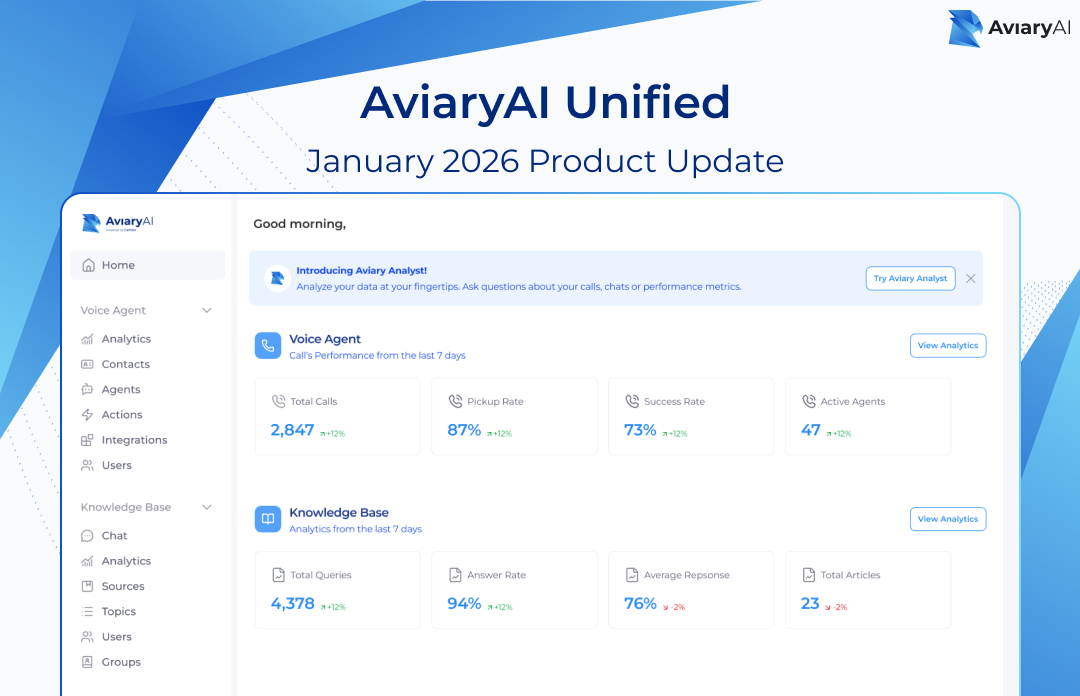
What's New
- Unified WorkspaceAll your tools in one place—no more switching between different websites
- Granular Access ControlBank-grade precision for managing who sees what
- Aviary AssistantAI-powered data analysis—get answers by asking questions
- Smarter Voice AgentMemory, time awareness, and inbound-specific greetings
1: Platform Overview & Navigation
The new unified platform brings Voice Agent, Knowledge Base, and Aviary Assistant together in one cohesive workspace. Everything you need is accessible from a single sidebar.

The Unified Sidebar
The left sidebar now organizes all your tools in clear sections. You can find both Voice Agent (Analytics, Contacts, Agents, Actions, Users) and Knowledge Base (Chat, Analytics, Sources, Topics, Users, Groups) in the same navigation panel.
What's New in Navigation
- "Usage" has been renamed to "Analytics" for clearer data access
- New "Organization" section for global settings and Product Access
- "Analyze your Data" button provides quick access to Aviary Assistant
- Collapsible sidebar sections let you customize your view
2: Roles and Permissions
The unified platform introduces a powerful new access control system. As a Global Admin, you have complete control over who can access each product and what they can do within it.
The Global Admin Role
The Global Admin is the "master key" holder who assigns users to specific products. From the Product Access page (found under Organization in the sidebar), you can turn product access On or Off for any employee.

Understanding Product & Role Access
Each user can be assigned different roles for different products. The role dropdown lets you set precise permissions:
Available Roles
- Global Admin: Full control over all products and user access
- Product Admin: Manage users and settings within a specific product
- Product User: Standard access to use features (permissions vary by product)
- No Access: Product is hidden from this user
Bulk Editing Access
Need to update permissions for multiple users at once? Select multiple users using the checkboxes, then click Edit Access to modify their product permissions in bulk.

Knowledge Base: Groups and Topics Access
The Knowledge Base uses a two-tier model for access control: Users belong to Groups, and Groups have access to specific Topics with defined permission levels.
Creating a New Group
When creating a group, you assign it access to specific Topics and set the permission level for each:

Knowledge Base Permission Levels
- Sources & Contribute: Full control within topic - add/edit/delete sources, give feedback
- Contribute: Read content and provide feedback on answers
- View Only: Read-only access to topic content
Voice Agent: User and Agent Access
Voice Agent access works at both the product level and the agent level. This allows you to give team members the exact tools they need for specific agents without exposing the whole system.
Agent-Level Permissions
For Product Users, you can set granular permissions at the agent level. Select which agents they can access and what actions they can perform:
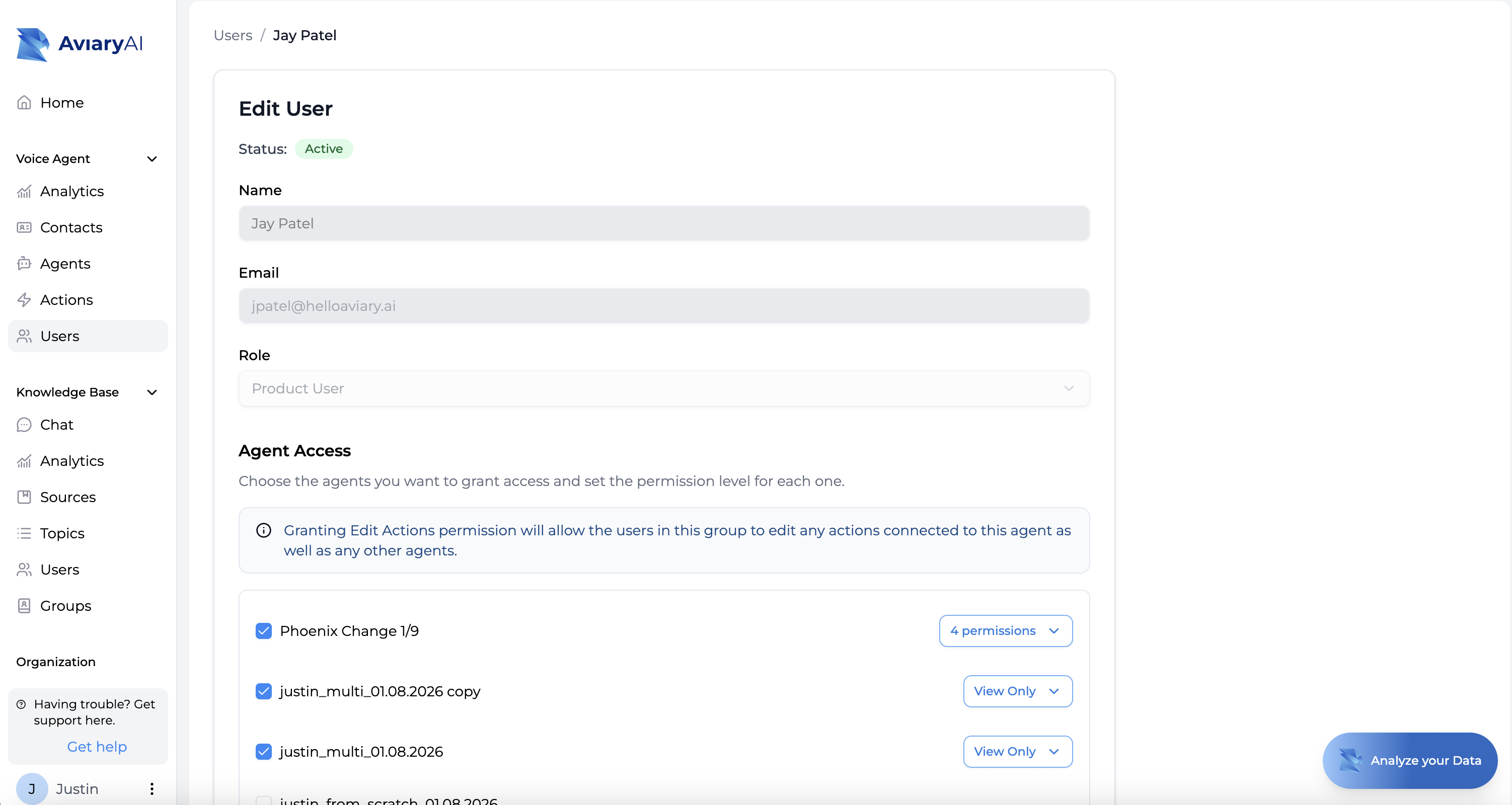
- View Only: See agent configuration and call history (read-only)
- Edit Agent Configuration: Modify agent settings and prompts
- Edit Actions: Modify actions connected to agent and other agents
- Test Voice Agents: Make test calls to agents*Start/Pause Calls (Beta)Control live call campaigns
*Start/Pause calls not available for all accounts.
3: Aviary Assistant
Aviary Assistant (previously called "Playground") is your new AI-powered data analysis tool. Get instant answers about call trends, document usage, and performance metrics—just by asking questions in plain English.

Chatting with Your Data
Access Aviary Assistant from the "Analyze your Data" button in the bottom-right corner, or from the promotional banner at the top of the home page. You can ask questions like:
- "How many calls were about mortgage rates today?"
- "What are the most common questions in our Knowledge Base?"
- "Show me call performance trends for the last 7 days"
- "Which topics have the highest answer rate?"
Built-in Security
Aviary Assistant respects all your access permissions. If a user doesn't have access to a specific topic or agent, the Assistant won't discuss it or include it in analysis results. Your data boundaries are automatically enforced.
4: Voice Agent Enhancements
This release includes three powerful new capabilities for Voice Agent that make conversations smarter, more personalized, and more natural.
Conversation Memory
Your Voice Agent can now remember previous conversations with the same contact. This enables more personalized, contextual interactions that reference what was discussed before.
How it works:
- The agent automatically receives summaries of the last 5 conversations with each contact
- Each summary includes the date and key outcomes from that call
- If a previous call went to voicemail, the agent knows a message was left and when
- Enable this feature through the pre-call action settings in your agent configuration
Example use case: For collections, if a member previously committed to a payment date but didn't follow through, the agent can reference that commitment and adjust its approach accordingly.
Time-Aware Conversations
Voice Agent now knows what time it is. This seemingly simple change enables smarter, more natural conversations.
What this enables:
- Appropriate greetings: "Good morning" vs "Good afternoon" vs "Good evening"
- Smart scheduling: Won't offer appointment times that have already passed today
- Business hours awareness: Won't offer transfers to departments that are closed
- Context-appropriate responses based on time of day
The agent receives the current date/time, contact's time zone, and your organization's time zone automatically—no configuration required.
Inbound-Specific Intro Lines
You can now configure a separate intro line specifically for inbound calls. This creates a smoother experience when members call in, eliminating the awkward pause of playing both intro sequences.
Why this matters:
- Faster time-to-interaction for inbound callers
- Tailored greeting that acknowledges the member initiated the call
- Configure in your agent settings under the new "Inbound Intro" field
Voice Agent Enhancements Summary
FeatureBenefitConversation MemoryMore personalized calls that reference previous conversationsTime AwarenessSmarter scheduling, appropriate greetings, business hours awarenessInbound Intro LinesFaster, smoother experience for members who call in
Frequently Asked Questions
Q: What happened to my old login? Do I need new credentials?
A: No, your existing credentials work exactly as before. The unified platform simply brings all your tools together under one roof—you'll log in the same way and see all your products in a single sidebar.
Q: I can't see the Knowledge Base (or Voice Agent) anymore. What happened?
A: Your Global Admin may not have granted you access to that product yet. Contact your administrator and ask them to enable your access through the Product Access page under Organization settings.
Q: What's the difference between a Global Admin and a Product Admin?
A: A Global Admin has the "master key"—they control who can access each product and can see everything. A Product Admin can manage users and settings within their specific product (Voice Agent or Knowledge Base) but cannot grant access to other products.
Q: Can someone be a Product Admin for one product and a Product User for another?
A: Yes! Each product has its own role assignment. For example, your compliance manager might be a Product Admin for Knowledge Base but only a Product User for Voice Agent.
Q: How do I give a team member access to only one Voice Agent, not all of them?
A: Set them as a Product User for Voice Agent, then go to Voice Agent → Users, click on their name, and configure their Agent Access. You can select specific agents and set different permission levels for each one.
Q: What are Groups in the Knowledge Base, and why do I need them?
A: Groups let you organize users by department or function and assign them access to specific Topics with defined permission levels. For example, create a "Support Team" group with Contribute access to customer service topics, and a "Compliance" group with Manage Sources access to regulatory topics.
Q: Can a user belong to multiple Groups?
A: Yes. Users inherit topic access from all their groups. If conflicting permissions exist, the highest permission level applies (Manage Sources > Contribute > View Only).
Q: What is Aviary Assistant, and is it the same as the old Playground?
A: Yes, Aviary Assistant is the renamed and enhanced version of Playground. It's now a powerful AI-driven tool for analyzing your Voice Agent calls and Knowledge Base usage. Ask questions in plain English and get instant insights.
Q: Can Aviary Assistant see data I don't have access to?
A: No. Aviary Assistant respects all your access permissions. It will only analyze and discuss data from topics and agents you're authorized to view. Your organization's data boundaries are always enforced.
Q: Where did the Knowledge Base "Usage" section go?
A: It's been renamed to "Analytics" for clarity. You'll find it in the same location in the sidebar under the Knowledge Base section.
Q: How do I update permissions for many users at once?
A: Go to Organization → Product Access, select multiple users using the checkboxes, then click "Edit Access" to modify their product permissions in bulk. You can add or remove access to Voice Agent, Knowledge Base, and Aviary Assistant all at once.
Q: I'm a Global Admin. Can I still see and do everything?
A: Yes. Global Admin status gives you full access to all products, all features, and all user management capabilities across the entire platform.
Q: How do I get help if something isn't working?
A: Click "Having trouble? Get support here." at the bottom of the sidebar, or contact your AviaryAI representative directly. You can also reach out to support@helloaviary.ai.
Q: How does Conversation Memory work? Do I need to turn it on?
A: Conversation Memory is enabled through pre-call action settings in your agent configuration. Once enabled, the agent automatically receives summaries of the last 5 conversations with each contact, including dates and outcomes. Voicemail attempts are included in the voice agent’s memory.
Q: How does the Voice Agent know what time zone to use?
A: The agent automatically receives three time references: UTC time, the contact's time zone (based on their state), and your organization's contact center time zone. This happens automatically—no configuration required.
Q: Where do I configure the inbound-specific intro line?
A: In your agent configuration, you'll see a separate "Inbound Intro" field alongside the existing intro line. This allows you to set a different greeting for when members call in versus when your agent makes outbound calls.
Summary: Getting Started
The Unified Platform is designed to make your team more efficient while keeping your data secure. Here's what to do next:
For Global Admins
- Review your team's product access under Organization → Product Access
- Assign Product Admin roles to department managers who need autonomy
- Set up Knowledge Base groups to match your department structure
For Product Admins
- Review user permissions within your product
- For Knowledge Base: create groups for different permission levels
- For Voice Agent: configure agent-level access for your team
For All Users
- Explore the new unified sidebar navigation
- Try Aviary Assistant for quick data insights
- Contact your admin if you need access to additional features
Questions? Click "Having trouble? Get support here." in the sidebar or contact your AviaryAI representative.